Public documentation
UI Feature Guide
Use this page when you need the real section-by-section guide. It maps the shipped panel surfaces and linked local workspace to the browser APIs, local libraries, reviewer steps, evidence classes, and accessibility boundaries that matter to both technical and non-technical users.
Actual top-level sections and related workflows
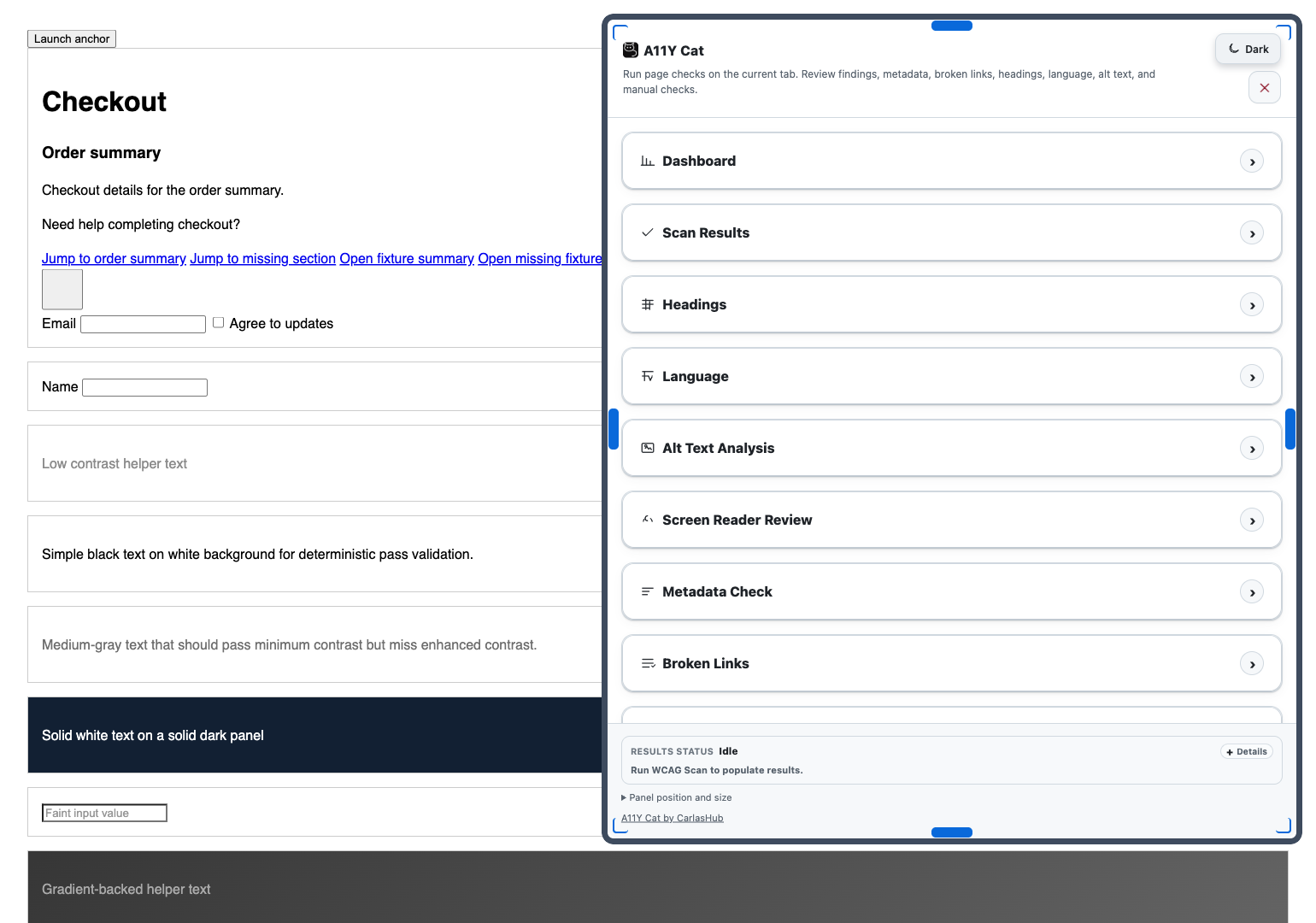
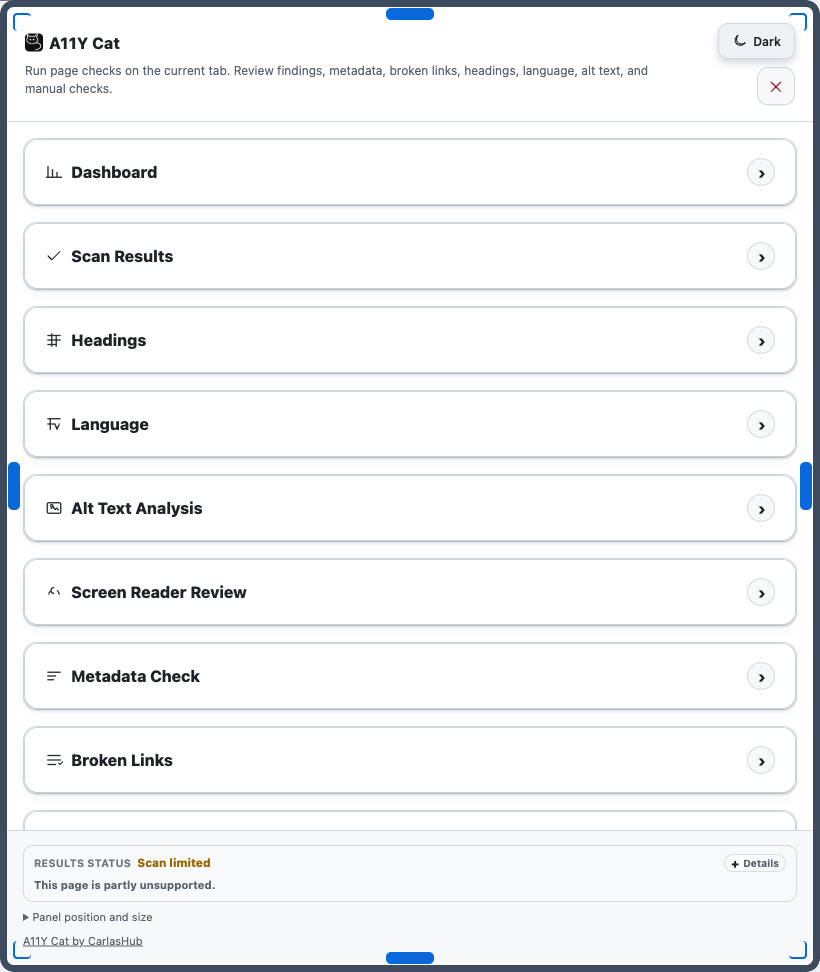
The shipped extension panel currently exposes these review sections: Scan Results, Broken Links, Metadata Check, Language, Keyboard & Focus Order, Interaction Checks, Headings, Browser Preferences QA, Page Review Overlays, Alt Text Analysis, Manual Checks, and Screen Reader Review. The panel opens one section at a time, so inactive sections are hidden while the active section owns the available content area.
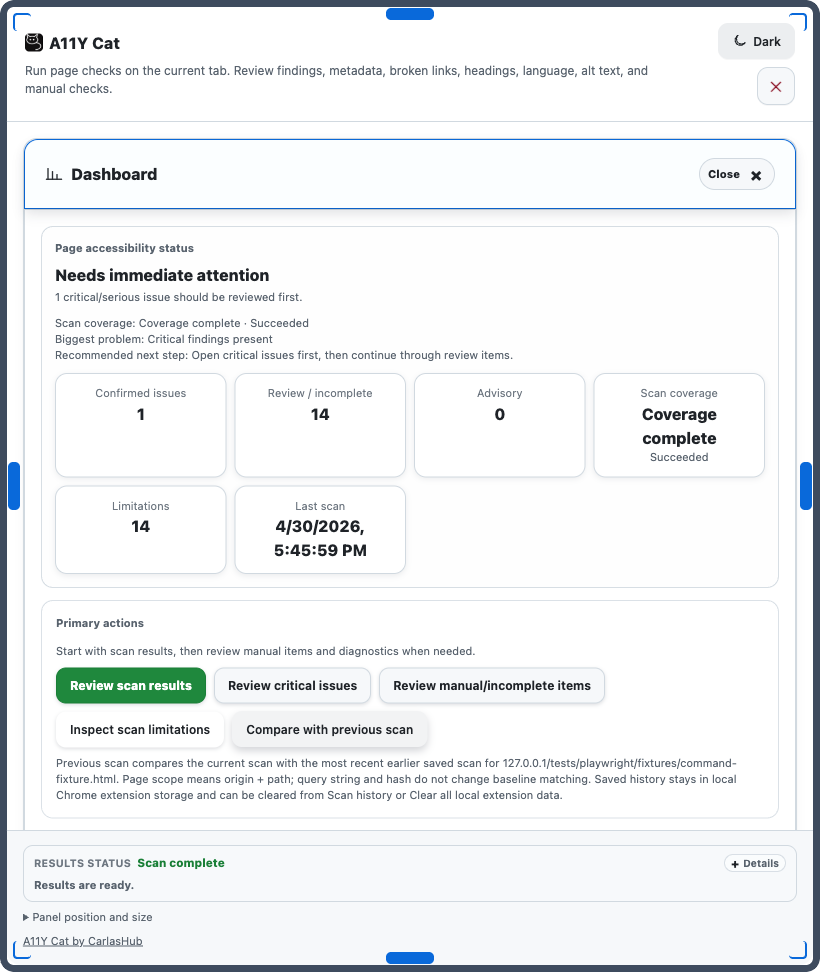
A11Y Workspace / Dashboard is still part of the product, but it opens as a separate local extension page behind Open Workspace rather than as a first-row injected panel tab. Ask A11Y Cat, filters, exports, theme, handoff actions, and local-data controls also sit outside the top-level section row.
On first toolbar launch, the extension runs the base page scan and pre-populates Scan Results, Metadata Check, Broken Links, Headings, Language, and Alt Text Analysis for the current page state. Section buttons rerun their own checks when you need fresh evidence.
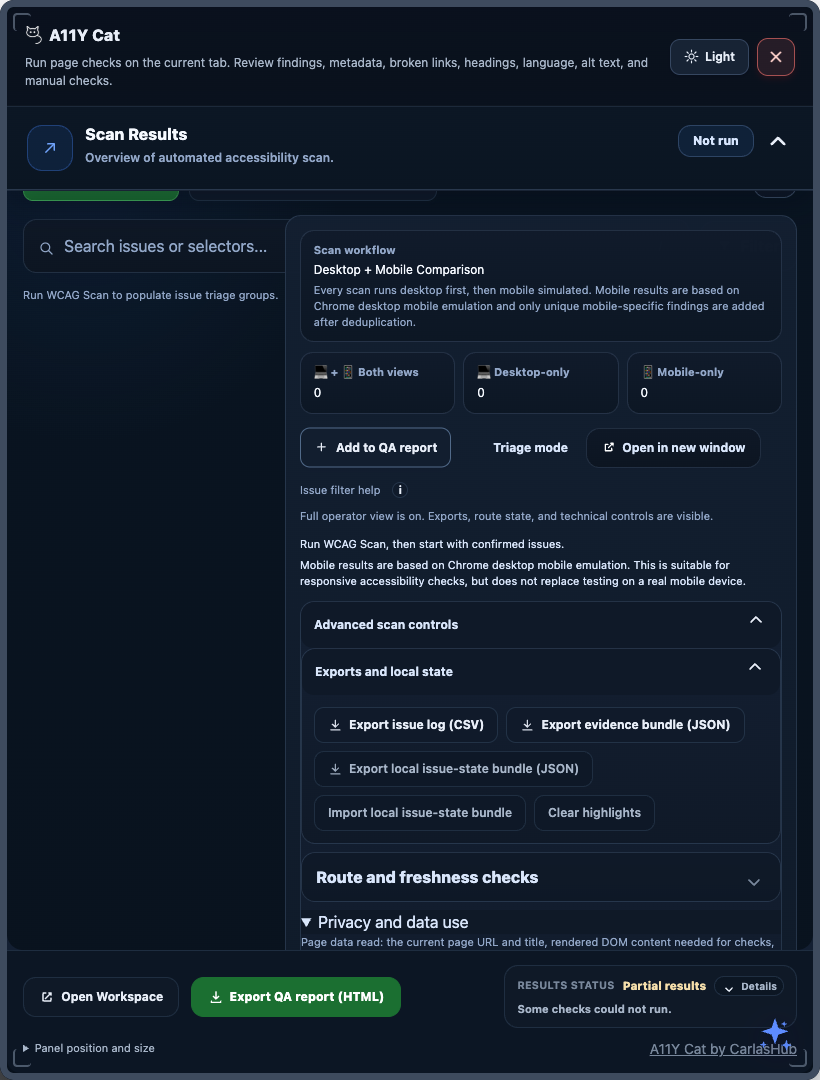
View current panel overview screenshotView workspace comparison screenshot
How to use this guide
- 1
Match the guide to the visible surface you are using
Each section below maps to a real panel section, page-side helper, or linked workspace area so reviewers can move from the UI they see to the right documentation without translating internal module names first.
- 2
Use the technical notes when traceability matters
The guide names the shipped browser APIs, local libraries, and evidence types so engineers, release reviewers, and auditors can connect the public documentation back to the actual runtime model.
- 3
Keep the evidence boundary explicit
Confirmed, review, advisory, limitation, diagnostic, and workflow output do not mean the same thing. Read the evidence class before turning any result into a defect, release claim, or accessibility statement.
Result classification quick reference
| Classification | Meaning | Needs human review? | Primary action |
|---|---|---|---|
| Confirmed | Highest-confidence issue evidence for the current rendered state. | Review context and user impact before release decisions. | Prioritise remediation, retest, and record evidence. |
| Needs review | Evidence that still needs human judgement before it becomes a defect. | Yes. | Inspect manually, then decide whether a real defect exists. |
| Advisory | Helpful quality or readiness signal that should not be treated as a definite WCAG failure. | Usually. | Use as guidance or backlog input. |
| Limitation | A known boundary of what the extension could not inspect, calculate, or prove. | Yes, if the uncovered state matters. | Use another method and avoid coverage overclaims. |
| Diagnostic | Technical support information about runtime state, permissions, exports, or scan coverage. | Not as a page failure. | Use for troubleshooting, support, and repeatability. |
| Workflow | Local review, handoff, note, or report-building state rather than a page verdict. | Yes. | Use to coordinate QA work, not to declare conformance. |
Libraries and browser APIs behind the interface
| Runtime area | Primary library or API | Why it exists in the product | Visible sections or controls |
|---|---|---|---|
| Launch and page access | chrome.action, activeTab, chrome.scripting, Manifest V3 service worker | Open the panel after explicit user action and inject packaged local scripts into the active tab only for that current page state. | All injected panel sections start here. |
| Automated scan and classification | Bundled axe-core 4.11.x plus A11Y Cat runtime classifiers | Produce automated findings, classify evidence, and populate the main grouped result surfaces without a remote scan server. | Scan Results, Manual Checks, Headings, Language, Alt Text Analysis, Metadata Check, Broken Links. |
| Keyboard and focus capture | A11Y Cat focus-inventory modules, programmatic focus capture, and page-state exclusion rules | Build bounded page-level focus order evidence while keeping extension-owned UI and page-side badges out of the captured set. | Keyboard & Focus Order. |
| Interaction audits | chrome.debugger, A11Y Cat interaction-check models, widget-state runner, labelled DOM fallback | Dispatch trusted Tab, Shift+Tab, Enter, Space, and Escape evidence where available, keep fallback provenance visible, and compare saved runs for regressions. | Interaction Checks. |
| Preference utilities and page overlays | chrome.debugger, extension-side preview state, computed style inspection, injected page helper, reduced-motion and focus-review utilities | Support browser-preference review, page-side helper controls, visual badges, outlines, and heuristic review workflows without claiming automatic proof. | Browser Preferences QA, Page Review Overlays, interaction review conditions. |
| Language and spelling review | Local language heuristics and a CSpell-derived local engine | Review visible text for likely language mismatch and spelling concerns without a remote API. | Language. |
| Screen reader review aid | Guidepup virtual screen reader bundle and browser TTS where available | Support structured non-visual review preparation and note-taking before or alongside real assistive technology testing. | Screen Reader Review. |
| Local storage, workspace, and exports | chrome.storage.local, local history modules, dashboard/workspace snapshot builders, CSV/JSON/HTML export builders | Store local workflow state, run history, workspace snapshots, and user-triggered evidence exports without a developer server. | Open Workspace, previous scan/history, exports, QA report, clear-data controls, diagnostics. |
A11Y Workspace / Dashboard
The workspace is a local extension page opened through Open Workspace. It is not injected into the reviewed page and it is not one of the first-row panel sections. This is where deeper overview, issue-log, comparison, report-builder, diagnostics, and saved-scan workflows live when the small panel is not enough.
Why it is needed
It gives teams a larger review surface for triage, comparison, reporting, and diagnostics when the injected panel is too small for the full workflow.
WCAG focus
Indirect support only. It organizes evidence tied to any captured criteria and helps reviewers retest and communicate issues consistently.
What to expect
Overview counts, issue log, previous-scan comparison, report-builder flows, diagnostics, and saved local workflow context.
- 1
Open the workspace after you have a scan worth comparing or handing off
Use it when you need more than a quick panel review, especially for issue logs, previous-scan comparison, report building, or diagnostics.
- 2
Use the overview and issue log as local review navigation, not as a second scan engine
The workspace reflects the latest saved extension snapshot and local workflow state for the current scope. It helps reviewers move through the evidence already captured.
- 3
Compare like-for-like states
Use the same route, auth state, viewport, and interaction state when comparing previous and current runs. Otherwise the delta may describe a different page state rather than a real regression.
- 4
Treat the workspace as local review support, not as a page-level proof surface
It helps organise evidence, exports, and history, but it still depends on the underlying captured run and does not replace fresh testing on the live page state.
Powered by
Dashboard/workspace view models, local workflow state, local history, report-builder state, diagnostics, and chrome.storage.local workspace snapshots.
Accessibility relevance
Supports triage, comparison, evidence packaging, and clearer communication about what changed and what still needs retest.
Evidence value
High-value review coordination surface, especially for repeated reviews and cross-team handoff.
Manual boundary
The workspace reflects local saved state. It does not prove that the live page still matches the snapshot or that every route, breakpoint, or workflow was covered.
View workspace comparison screenshotRead previous scan and history guideRead exports and local data guide
Scan Results
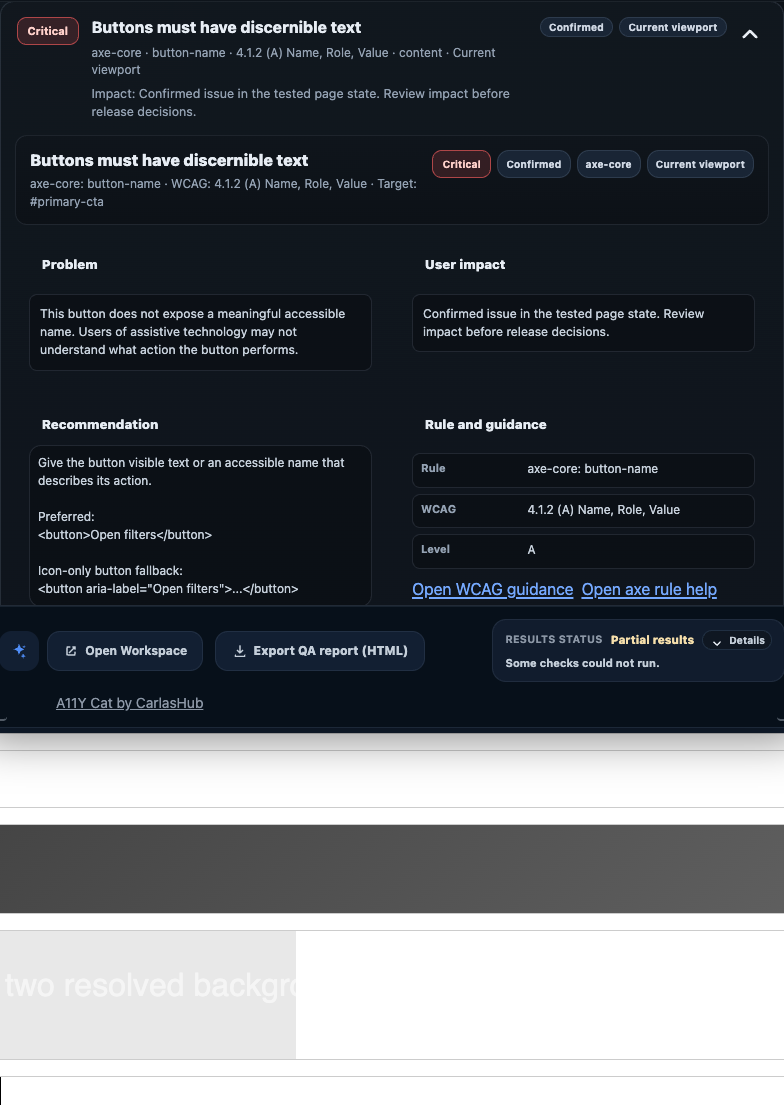
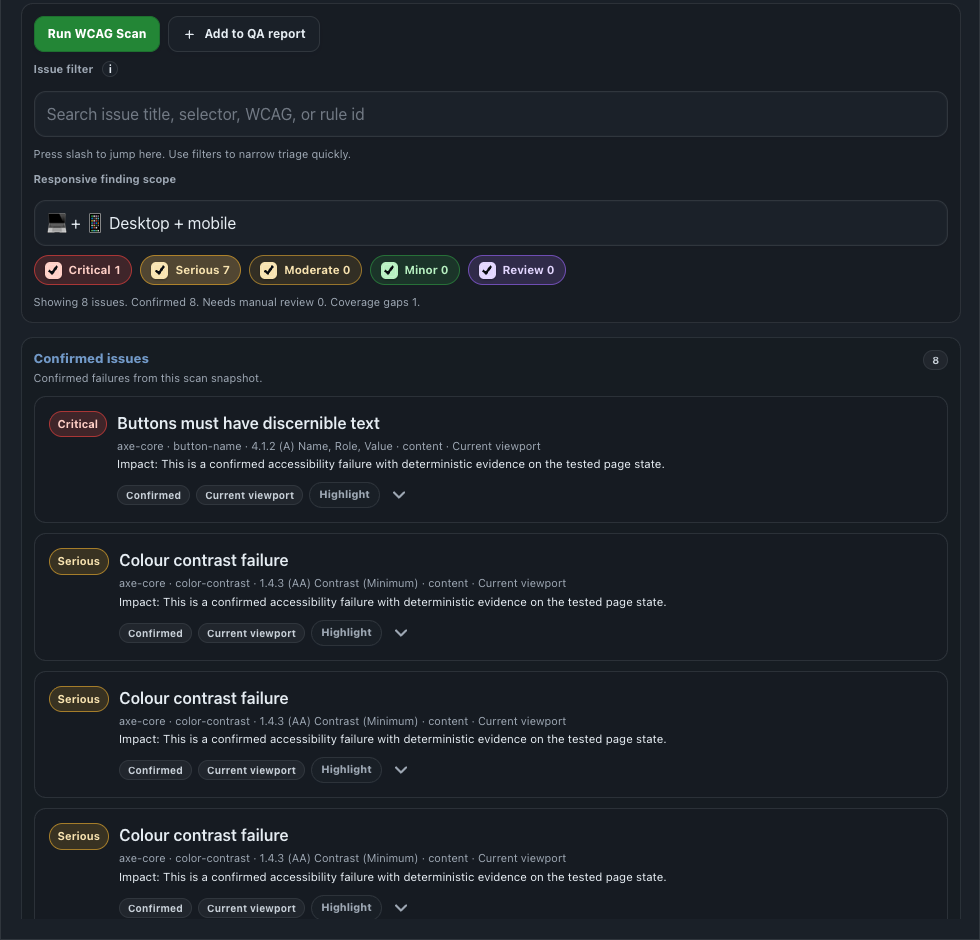
Scan Results is the main automated review surface. It groups confirmed issues, review items, advisory output, limitations, and diagnostics for the current rendered page state and gives reviewers the direct path to selectors, issue details, highlight actions, exports, and QA handoff controls.
Why it is needed
It is the fastest route to current-page issues and the detail engineers need to reproduce and fix them.
WCAG focus
Broad automated coverage. Common mappings include 1.1.1, 1.3.1, 2.4.4, and 4.1.2 where the runtime has deterministic evidence.
What to expect
Confirmed issues, needs-review items, filters, selectors, snippets, highlights, and export or handoff actions.
- 1
Run the scan on the page state you actually want to review
The extension uses temporary
activeTabaccess and packaged local script injection for that live page state only. Route changes, auth changes, and dynamic states can change the result set. - 2
Review confirmed issues first, then check what moved into review-only buckets
High-confidence scanner evidence stays separate from work that still needs human judgement so obvious defects are not buried under ambiguous items.
- 3
Use selectors, snippets, filters, and detail views to move from triage to remediation
Issue details expose rule IDs, selectors, supporting snippets, severity, evidence provenance, and issue actions such as inspect, highlight, selector copy, or QA report inclusion.
- 4
Route unresolved review work into Manual Checks, Screen Reader Review, or the relevant feature-specific section
Scan Results is the hub, not the end of the workflow. Ambiguous evidence still needs a reviewer decision before it becomes a real defect or release claim.
Powered by
chrome.action, activeTab, chrome.scripting, bundled axe-core, and A11Y Cat result-shaping modules.
Accessibility relevance
This is the main route to current-page automated evidence and the first point where reviewers can separate confirmed issues from guided review work.
Evidence value
Strongest item-level evidence in the extension for the current rendered state, plus the most direct route to selectors, source, and exportable detail.
Manual boundary
The surface still represents only the current rendered state. Hidden routes, deferred content, real keyboard flow, real AT behaviour, and unsupported contexts need separate review.
View current Scan Results screenshotView confirmed issues sectionView highlight action


Manual Checks
Manual Checks holds structured review workflow material that the automated scan cannot close out safely. It exists so incomplete or context-dependent evidence does not get flattened into a false pass/fail claim.
Why it is needed
It keeps human-review work visible when automation cannot safely decide the result on its own.
WCAG focus
Criteria that often need judgement, such as 1.3.1, 1.4.3, 2.4.4, and 3.3.x depending on the issue being reviewed.
What to expect
Structured review cards, supporting selectors or snippets where available, and explicit next-step guidance instead of a pass/fail verdict.
- 1
Open Manual Checks after Scan Results or a tool routes work there
Use it when the extension has enough evidence to guide the reviewer but not enough to prove the outcome deterministically.
- 2
Read the structured guidance cards before deciding defect status
Manual checks explain what to inspect next, which selectors or snippets matter, and which parts of the user journey still need direct confirmation.
- 3
Record the outcome in your QA workflow, not in the tool alone
The section organises work and can support exports or highlights, but the actual pass/fail decision still belongs to the reviewer and their release process.
Powered by
A11Y Cat manual-review generation, issue-routing logic, and local workflow support where the runtime cannot safely auto-confirm the result.
Accessibility relevance
Keeps review-only evidence visible and honest instead of hiding it behind a scanner summary or overstating it as a deterministic failure.
Evidence value
Review workflow material, not a direct conformance verdict.
Manual boundary
The section organises the work. It does not auto-confirm pass/fail and it does not replace real task-based accessibility testing.

Screen Reader Review
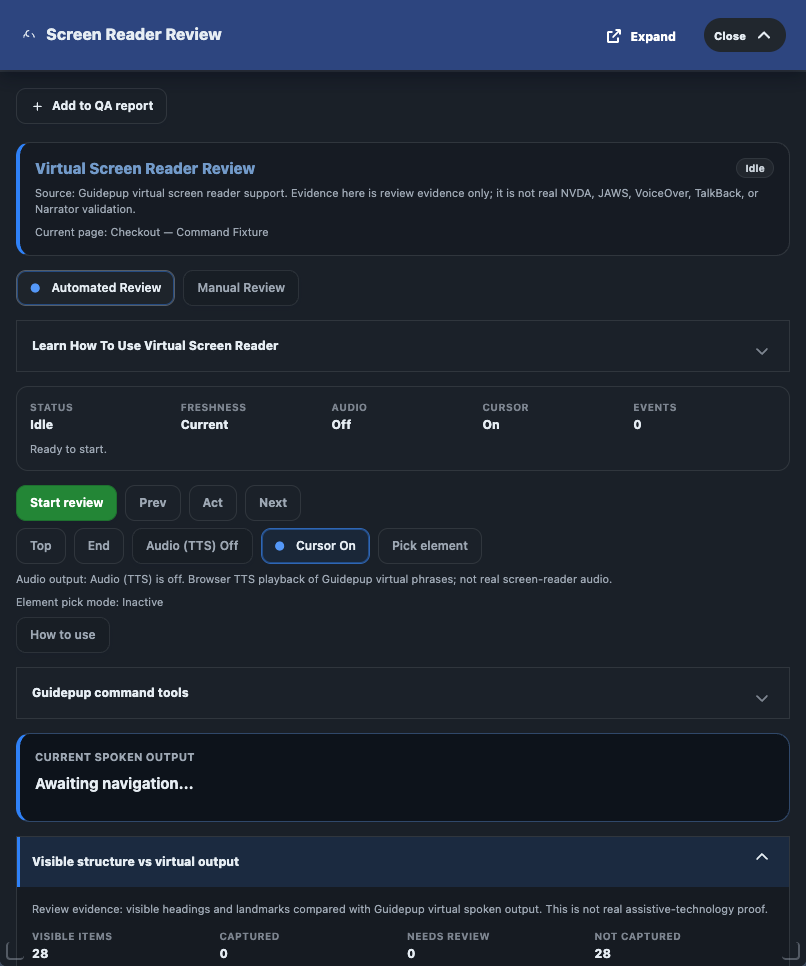
Screen Reader Review is a structured review aid, not a replacement for NVDA, JAWS, VoiceOver, TalkBack, Narrator, keyboard-only testing, or real user-task testing.
Why it is needed
It helps reviewers plan non-visual checks before they move into real assistive-technology testing.
WCAG focus
Commonly supports 1.3.1, 2.4.3, and 4.1.2 review, but real NVDA, JAWS, VoiceOver, or equivalent behavior still decides the release claim.
What to expect
Guided review prompts, note-taking support, and preparation for a real browser plus screen-reader test.
- 1
Open the aid after you understand the page structure and main findings
Use it once the automated scan, manual checks, and structural evidence have given you enough context to plan a real assistive-technology check.
- 2
Review expected reading order and capture notes
Use the guided surface to organise what you expect to hear or reach in the user journey, then record observations and follow-up work.
- 3
Compare with real assistive-technology behaviour
Use the target browser and assistive-technology combination for the release decision. Differences found there outrank the virtual aid.
Powered by
Guidepup virtual screen reader support, browser TTS where available, and local note-taking or export flows.
Accessibility relevance
Helps reviewers prepare non-visual reading-order and interaction checks before or alongside real AT testing.
Evidence value
Structured review preparation and review-note evidence.
Manual boundary
It never proves real AT output. Real browser/AT combinations still decide the release claim.
Keyboard & Focus Order
Keyboard & Focus Order is the page-level focus evidence section. It builds a focusable inventory, runs a bounded programmatic focus-order capture for the current page state, separates confirmed findings from review-only findings, and keeps extension-owned UI plus page-side focus badges out of the captured evidence set.
Why it is needed
It surfaces focus-order and focus-visibility risks early without requiring a full widget interaction audit first.
WCAG focus
Strongest fit is 2.1.1, 2.4.3, 2.4.7, 2.4.11, and 4.1.2 for the captured page state.
What to expect
Focusable inventory, captured order, focus badges, confirmed versus review findings, and exportable focus evidence.
- 1
Run Capture focus order on the page state you want to review
This creates a bounded focus sequence for the current page state. It is not the same as the real debugger-dispatched Tab traversal that lives in Interaction Checks.
- 2
Review the summary and finding cards before opening the full sequence
Confirmed findings are limited to states the capture can actually prove, such as positive
tabindex, focusablearia-hiddencontent, or a fully obscured focused target. - 3
Use Show focus badges only after a capture exists
The numbered page-side badges help visual inspection, but they are excluded from the focus inventory so they do not contaminate the captured evidence.
- 4
Export or report the bounded evidence only when it helps the review record
Technical details can export focus evidence, add the section to the QA report, or include full focus-order detail when the extra traceability is useful.
Powered by
A11Y Cat keyboard-focus analysis, focusable inventory capture, programmatic focus sequencing, and runtime-owned-UI exclusion rules.
Accessibility relevance
Supports keyboard reachability, focus order, focus visibility, and focus-obscuring review for the current page state.
Evidence value
Mixed evidence: confirmed when the runtime can prove the problem, review when the signal still needs human judgement, and unable-to-determine where the runtime cannot safely prove the state.
Manual boundary
The section does not prove every widget state, every route, every real :focus-visible result, or every screen-reader outcome. Real tabbing and Interaction Checks still matter.
Interaction Checks
Interaction Checks is the bounded keyboard-interaction evidence section. It combines real trusted-key traversal where available, safe widget audits, workflow traces, saved run history, and previous-run comparison so QA can capture repeatable interaction evidence without pretending the tool crawled every user task.
Why it is needed
It captures bounded keyboard interaction evidence for widgets and flows that simple scanning cannot prove safely.
WCAG focus
Mainly 2.1.1, 2.4.3, 2.4.7, and 4.1.2, especially for stateful controls, dialogs, and focus-return behavior.
What to expect
Tab traversal cards, widget audits, workflow traces, run conditions, saved history, and previous-run comparison notes.
- 1
Choose the right submode before you run it
Use Tab traversal for ordered keyboard-path evidence, Widget audits for safe Enter/Space/Escape state checks, Workflow runner for bounded flows such as dialog open/tab/Escape, and History & comparison when regression tracking matters.
- 2
Set the run condition and scope explicitly
You can change traversal preset depth, audit one selected safe widget or a bounded top-3 batch, and rerun under the current page state or a mobile simulated viewport condition.
- 3
Review keyboard path, key-state details, and boundary notes together
Watch for focus loss, hidden focus, positive
tabindex, unnamed focused controls, early loops, state-unchanged warnings, missing Escape restore, focus-return gaps, or labelled DOM/scripted fallback evidence. - 4
Use saved-run history and export only when the bounded evidence is useful
Interaction evidence JSON and QA report inclusion help when QA needs repeatable proof of a regression or a stable handoff record for a known page state.
Interaction review conditions
The section includes a scoped review-conditions subpanel for reduced motion, text spacing, focus review, hidden focusable review, helper open, and reset. Use the full Page Review Overlays section when your interaction review also depends on headings, landmarks, links, forms, or ARIA-state overlays.
Powered by
chrome.debugger, A11Y Cat interaction-check models, widget-state recipes, before/after state snapshots, saved local run history, and explicit fallback provenance.
Accessibility relevance
Supports keyboard operability, focus order, focus return, dialog/widget state review, and regression tracking for interaction-sensitive flows.
Evidence value
Actual keyboard traversal evidence plus review and limitation notes for bounded widget and workflow audits.
Manual boundary
The tool sends bounded Tab/Shift+Tab only for traversal and audits one selected safe target or a bounded top-3 batch. It does not type into fields, submit forms, crawl the site, or replace manual assistive-technology testing.
Headings
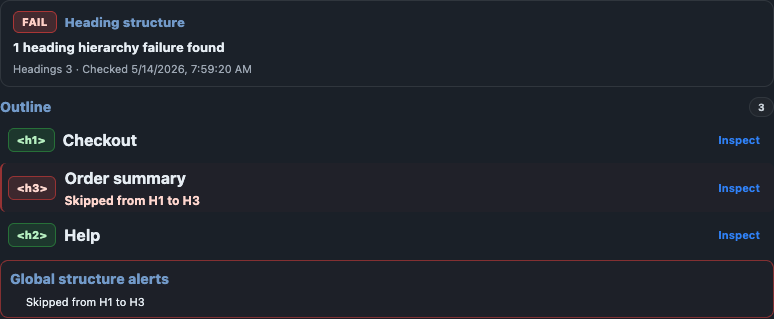
The Headings surface helps reviewers inspect semantic structure, visible H1 use, skipped levels, ARIA headings, hidden headings, and heading-like visual text that does not map cleanly to markup.
Why it is needed
It confirms whether the page outline supports navigation, scanning, and content hierarchy for non-visual users.
WCAG focus
Most directly supports 1.3.1, 2.4.1, and 2.4.6, with useful context for heading navigation in screen readers.
What to expect
Ordered heading structure, H1 coverage, skipped-level warnings, and semantic-versus-visual hierarchy review.
- 1
Open Headings when structure and navigation matter
Use it for long pages, dashboards, documentation, and flows where screen-reader or keyboard users depend on a sensible outline.
- 2
Review semantic order and visible hierarchy together
Check whether the heading sequence supports the content and whether the visual hierarchy suggests a conflicting structure.
- 3
Confirm whether the finding is structural or contextual
Some pages intentionally break a simplistic outline pattern, so reviewers still need content and layout context before filing every heading warning as a defect.
Powered by
A11Y Cat heading-analysis modules inspecting rendered heading elements, ARIA heading roles, and document order.
Accessibility relevance
Headings support page navigation, content scanning, reading-order expectations, and the later review work that happens in real screen readers.
Evidence value
Confirmed, needs-review, or advisory output depending on how strong the structural signal is.
Manual boundary
Visual hierarchy, component semantics, and authoring intent still need human review. Heading output does not replace a full IA or content-strategy review.
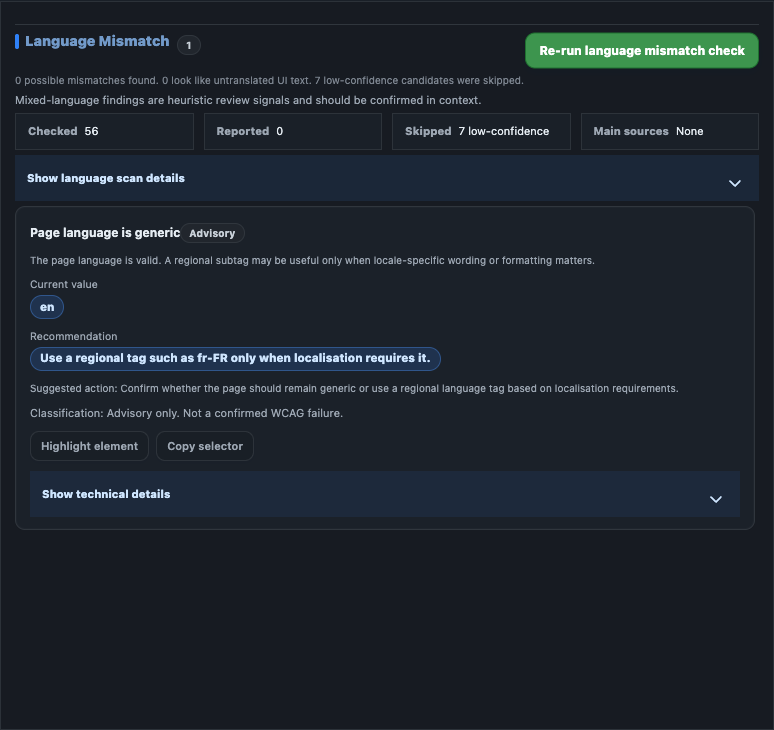
Language
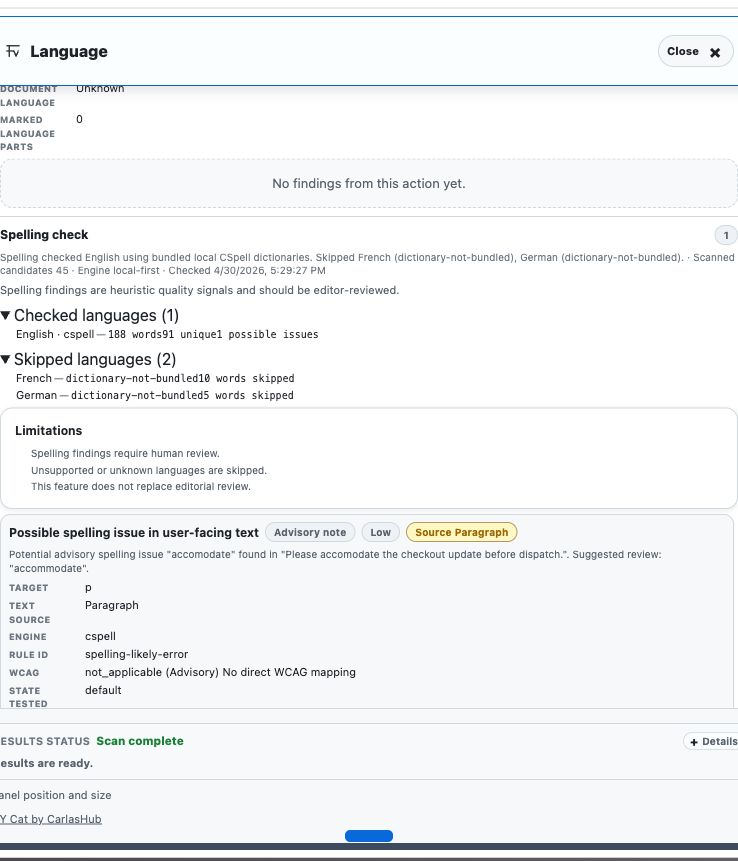
The Language tab covers text-quality checks that are useful in accessibility review but need careful interpretation because they can be language-, project-, or content-dependent. In the current public documentation set, that surface includes both language mismatch review and local spelling review.
Why it is needed
It catches metadata and copy issues that affect pronunciation, comprehension, and user trust.
WCAG focus
The clearest link is 3.1.1 and 3.1.2, with advisory copy-quality support where spelling weakens comprehension.
What to expect
Declared-language review, likely mismatch signals, spelling flags, and context-dependent editorial judgement.
Language mismatch workflow
- 1
Review declared language and visible text together
Use the tab to spot likely mismatches between page language metadata and the language detected from visible text.
- 2
Check mixed-language and short-copy cases manually
Short labels, brand names, user-generated content, or intentionally multilingual pages can trigger review-only evidence.
Spelling review workflow
- 1
Review flagged terms in context
Check the original sentence, nearby UI copy, and the target audience before deciding whether a flagged term is actually problematic.
- 2
Separate editorial issues from approved product vocabulary
Brand names, technical words, abbreviations, and internal terminology may need an allowlist or editorial decision rather than a defect.
- 3
Record the outcome as advisory guidance
Use spelling output to improve clarity and trust, but do not overstate it as a direct accessibility conformance failure.
Powered by
A11Y Cat language-detection heuristics plus a CSpell-derived local engine and dictionaries; no remote spellcheck API is used in the documented workflow.
Accessibility relevance
Language metadata affects pronunciation and reading rules; spelling affects comprehension, trust, and support-readiness.
Evidence value
Usually advisory or needs-review evidence rather than a direct automatic failure.
Manual boundary
Mixed-language, short, unsupported, brand-heavy, or domain-specific text still needs human confirmation and sometimes editorial policy input.
View current Language screenshotView spelling review screenshot
Alt Text Analysis
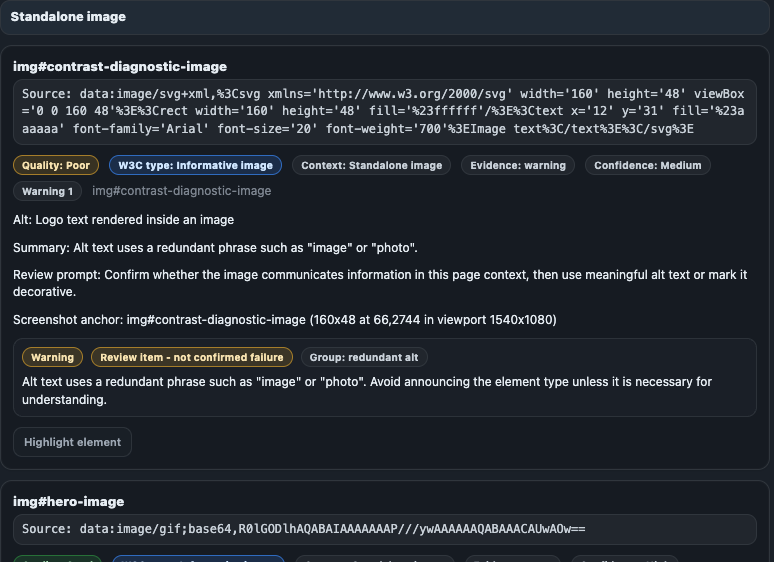
Alt Text Analysis separates missing or clearly broken image alternatives from context-dependent cases such as decorative images, linked images, SVG or icon patterns, complex graphics, and background-image situations that need reviewer judgement.
Why it is needed
It separates obvious missing text alternatives from image cases that depend on context and user intent.
WCAG focus
The primary mapping is 1.1.1, with related link-purpose context when images act as links or controls.
What to expect
Image classifications, missing or weak alt evidence, contextual review items, and remediation-ready image detail.
- 1
Open Alt Text Analysis when the page uses meaningful imagery
This surface is most useful on content-heavy pages, product cards, dashboards, and marketing pages where images carry information.
- 2
Check image role and context before judging the text alternative
Review whether the image is informative, functional, decorative, redundant, or complex before deciding what a good alternative should be.
- 3
Use the classification, then validate with content context
Confirmed missing alternatives are strong remediation candidates, but usefulness and quality of alt text still need human content judgement.
Powered by
A11Y Cat image and accessible-name analysis modules reading image elements, alt attributes, accessible names, linked-image context, and nearby cues where available.
Accessibility relevance
Text alternatives affect screen-reader output, link purpose, comprehension, and task completion for non-visual users.
Evidence value
Can produce confirmed or needs-review evidence depending on whether image purpose is obvious from markup and context.
Manual boundary
Decorative intent, complex images, diagrams, and the real usefulness of alternative text remain contextual and need human review.
Metadata Check
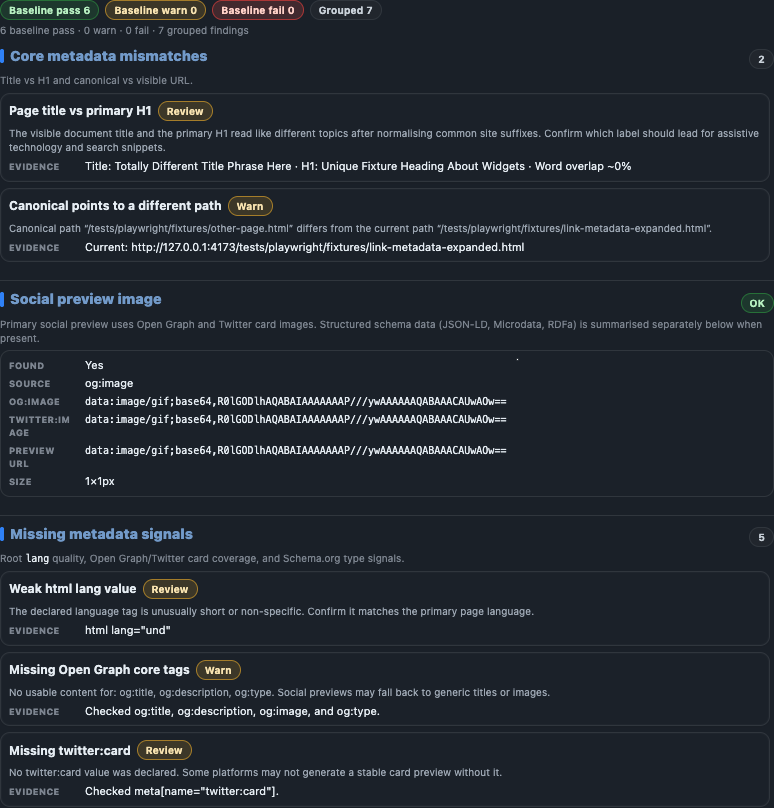
Metadata Check reviews document-level information such as title, description, canonical URL, Open Graph, Twitter card, and structured data. It helps reviewers catch page-quality and orientation problems that matter to users and downstream sharing surfaces.
Why it is needed
It catches orientation and naming problems before they affect tabs, previews, and handoff quality.
WCAG focus
The clearest WCAG link is 2.4.2, with supporting naming and consistency review where metadata and visible labels drift apart.
What to expect
Title, description, canonical, preview, and schema checks plus page-title and H1 consistency signals.
- 1
Open Metadata Check after the scan
Use it when you want page-level naming and preview information, not just DOM-level accessibility findings.
- 2
Review missing, malformed, or conflicting fields
Look for missing titles or descriptions, broken canonical values, weak preview metadata, or mismatches between page title and the visible H1.
- 3
Decide whether the output is accessibility-critical or quality guidance
Metadata can affect orientation, findability, and assistive context, but it is often advisory rather than a direct WCAG conformance result.
Powered by
A11Y Cat metadata and structured-data parsing modules reading document metadata, preview fields, canonical data, and schema signals locally in the browser.
Accessibility relevance
Page titles, descriptions, and label consistency help orientation, tab identification, and review readiness even when the output is not framed as a direct accessibility defect.
Evidence value
Mainly advisory or diagnostic evidence that can still be useful in QA handoff or documentation review.
Manual boundary
Project policy may treat metadata issues differently. Missing metadata is not automatically proof of a WCAG failure.
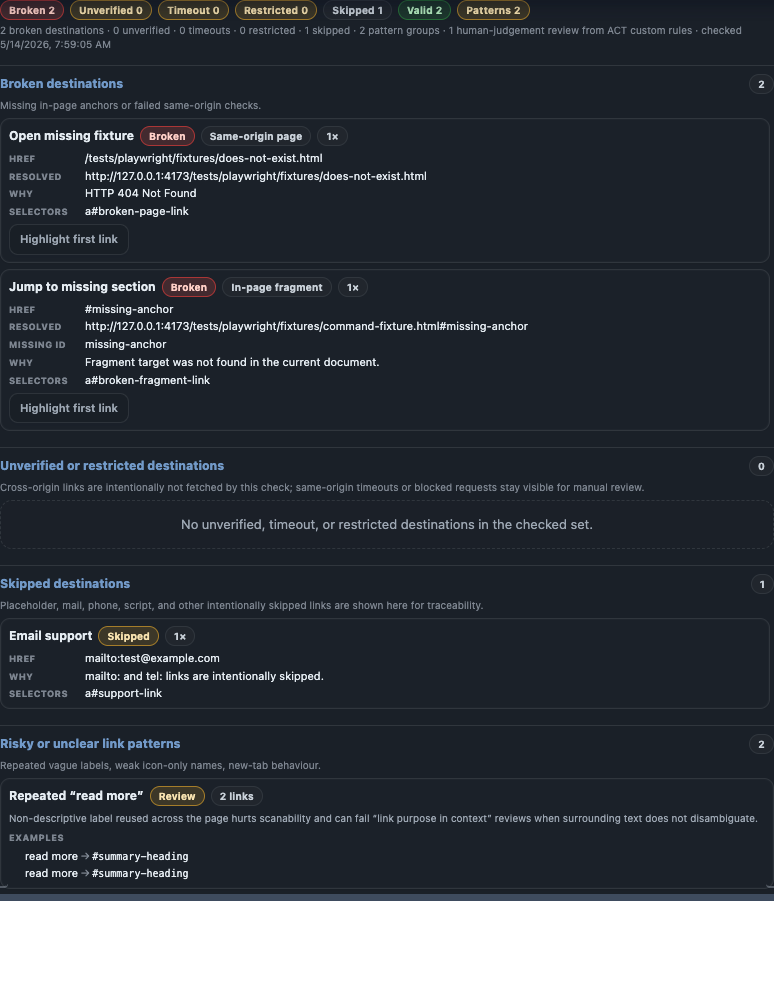
Broken Links
Broken Links focuses on supported link-status evidence and is most useful when navigation reliability or dead-end paths matter to the user journey.
Why it is needed
It finds dead ends and unstable navigation paths that can block task completion.
WCAG focus
It usually supports 2.4.4 and related navigation review rather than serving as a standalone WCAG verdict by itself.
What to expect
Same-origin link checks, broken versus valid states, and clear limitation labels for blocked or incomplete results.
- 1
Open Broken Links when navigation reliability matters
Use it to review same-origin links and supported request-status evidence from the browser context.
- 2
Check whether the evidence is complete
Cross-origin, authenticated, blocked, timeout, or rate-limited states can produce limitations or incomplete evidence instead of a confirmed broken-link result.
- 3
Confirm real user impact before filing a defect
Some broken-link evidence is advisory or environment-dependent, so reviewers should confirm whether the failure is reproducible in the target environment.
Powered by
A11Y Cat link-check modules using browser-context link discovery and same-origin status checks where safe and supported.
Accessibility relevance
Broken navigation can block task completion and create dead ends for keyboard and assistive-technology users.
Evidence value
Usually advisory, needs-review, or limitation evidence rather than a universal WCAG claim.
Manual boundary
Cross-origin, authenticated, blocked, or environment-specific links may need manual confirmation outside the extension.
Browser Preferences QA
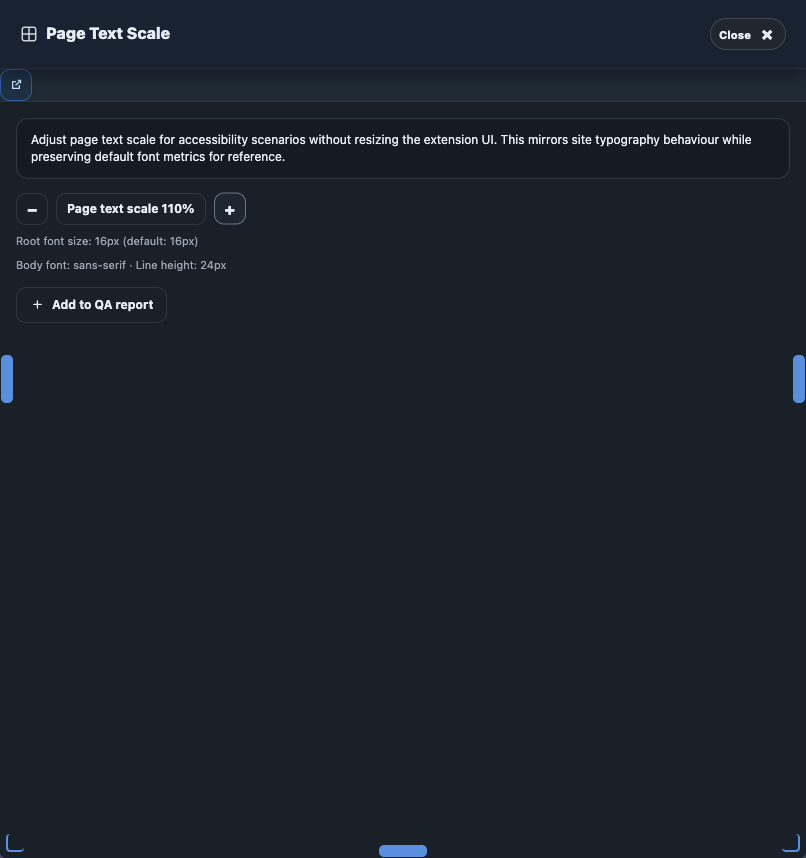
Browser Preferences QA is the utility-evidence surface for preference-state review. It owns the utility selection, expected-vs-found summary, tester observations, release evidence gates, and local exports. Page-side badges, outlines, helper status, collapse, and reset behaviour are documented under Page Review Overlays.
Why it is needed
It gives reviewers a controlled place to inspect motion, colour, text-spacing, and preference-sensitive page behavior.
WCAG focus
Common mappings include 1.4.3, 1.4.11, 1.4.12, 2.2.2, 2.3.3, and 2.4.7 depending on the utility you run.
What to expect
Utility selection, expected-versus-found summaries, tester observations, release evidence gates, and local exports.
- 1
Choose the utility or preset that matches the review question
Use the section for reduced motion, dark mode, high contrast, forced colours, text spacing, focus-review support, and related preference-state evidence for the current tab.
- 2
Apply the utility and review expected versus found
The section is designed to keep the tester grounded in what the utility was supposed to show, what the page actually did, and whether the mismatch is only a heuristic review signal or something stronger.
- 3
Save observations and complete release evidence gates where relevant
The documented gates include tester observation, reset cleanup, browser-level evidence where required, and real forced-colours or assistive-technology proof when the selected utility scope depends on them.
- 4
Reset all before continuing
Reset removes the active preview classes and helper state from the page without reloading it, reducing the risk of carrying review conditions into the next check accidentally.
Release evidence gates
Browser Preferences QA is explicit about what it cannot prove. Forced-colours and assistive-technology gates are user-controlled acknowledgements that real external proof was completed; they are not automation pretending to be Windows High Contrast, browser forced-colours proof, or NVDA/JAWS/VoiceOver validation.
Powered by
chrome.debugger where supported, extension-side preview state, computed style inspection, reduced-motion inventory, utility models, and local evidence/export builders.
Accessibility relevance
Supports readable-text, motion-reduction, colour-mode, focus, and presentation review for low-vision, cognitive, and vestibular-sensitive users.
Evidence value
Review and release-readiness evidence with explicit gates rather than automatic pass/fail claims.
Manual boundary
The section does not replace real browser zoom/reflow, real forced-colours mode, real keyboard-only testing, or real assistive-technology testing.
Page Review Overlays
Page Review Overlays is the page-side visual review companion. It controls the injected helper, active overlay status, page badges, outlines, review summaries, collapse, and reset behaviour for the active tab without mixing that page-side presentation layer into Browser Preferences QA utility evidence.
Why it is needed
It lets reviewers stress the live page visually without turning every overlay signal into a claimed failure.
WCAG focus
Review-only support across 1.3.1, 1.4.x, 2.1.1, 2.4.x, 3.3.x, and 4.1.2 depending on the active overlay mode.
What to expect
Page-side helper controls, badges, outlines, overlay summaries, and reset actions for headings, links, forms, focus, and related heuristics.
- 1
Open the helper when you need page-side review context
The helper uses the dedicated root
a11y-cat-browser-preference-qa-rootanda11y-cat-prefixed classes so the extension can stress the page visually without counting its own helper as page content. - 2
Choose the overlay mode that matches the review task
Available overlay categories cover reduced motion, dark mode review, high contrast review, forced colours review, text spacing review, focus review, hidden focusable review, headings, landmarks, links, buttons, forms, and ARIA-state review.
- 3
Inspect badges and summaries, then confirm with real user methods
The overlays help reviewers see where the likely issues are, but the result remains review/heuristic evidence until it is confirmed with manual keyboard, browser, forced-colours, or assistive-technology testing where relevant.
- 4
Reset page controls before moving on
Reset clears the active helper state, overlay classes, and review badges so the next test starts clean.
Powered by
Injected page helper root, visible badges, outlines, active overlay status, latest page-side summary, focus-review utilities, and helper reset/collapse controls.
Accessibility relevance
Supports page-side review for readable text, focus, structure, navigation, forms, states, and presentation-specific accessibility risks.
Evidence value
Review and heuristic evidence only. Overlay findings are not final accessibility verdicts.
Manual boundary
Forced-colours review remains a simulation, focus review can still miss true :focus-visible behaviour, and overlays do not replace real keyboard-only, zoom/reflow, or assistive-technology testing.
View related page-review controls screenshotView page highlight action
History, exports, diagnostics, and support workflows
These features support traceability, handoff, and support. Accessibility review is iterative: you need to compare scans, preserve notes, export authorised evidence, and explain coverage limits without overstating what the tool proved.
Previous scan and history
- 1
Compare like-for-like states
Use the same route, auth state, viewport, and interaction state when comparing two scans.
- 2
Read changed counts with limitations in mind
Changes can reflect product changes, but they can also reflect different page state, coverage, or runtime conditions.
Exports and local state
- 1
Choose the export type that fits the audience
CSV helps spreadsheet or ticket triage, JSON preserves structured evidence, QA report HTML supports human-readable handoff, and diagnostics or review-state exports support reproduction.
- 2
Confirm the data is authorised to leave the browser
URLs, selectors, snippets, diagnostics, notes, and workflow state can all be sensitive after export.
- 3
Clear local data when the review window ends
Use clear-data controls and your organisation's retention policy together.
Diagnostics and scan limitations
- 1
Open diagnostics when something looks incomplete or blocked
Use the diagnostic surface when scans are unexpectedly quiet, coverage drops, or a page type refuses to scan.
- 2
Use limitations to explain coverage, not defects
Diagnostics help reviewers say what the tool could not inspect, which is different from claiming the page passed or failed.
Powered by
chrome.storage.local, local history modules, export builders, and diagnostic collectors for permissions, frames, runtime state, storage support, and coverage boundaries.
Accessibility relevance
Supports remediation follow-up, evidence sharing, and honest communication about what the extension could and could not inspect.
Evidence value
High-value traceability and support context, especially for repeated reviews and cross-team handoff.
Manual boundary
History is not automatic regression proof and diagnostics are not page defects. Important user journeys still need manual retest.
View previous-scan comparison workflowView CSV export actionView JSON export actionView diagnostics detailsView scan limitations
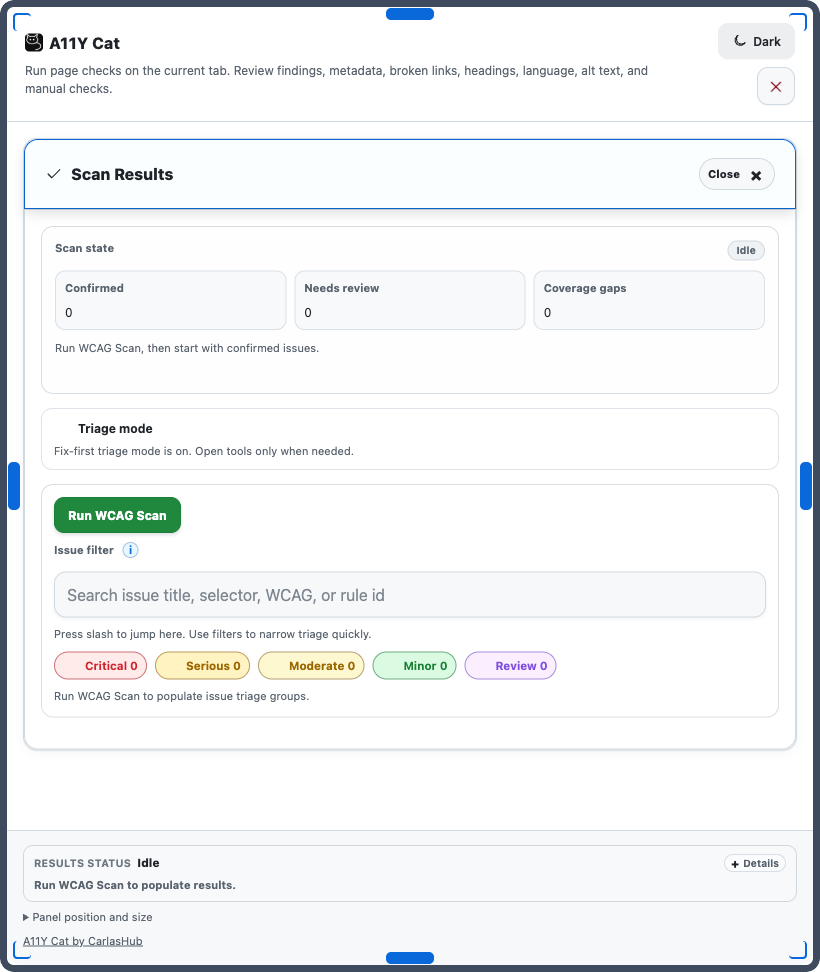

Shared review controls across the panel
Several important features are not a dedicated first-row section, but they still shape how reviewers work and how accessible evidence moves into handoff, export, or local follow-up workflows.
Filters, issue details, and counts
Severity and classification filters
Narrow the list to confirmed issues, needs-review items, advisory signals, or a specific impact level. Filters change the view, not the underlying classification.
Issue details
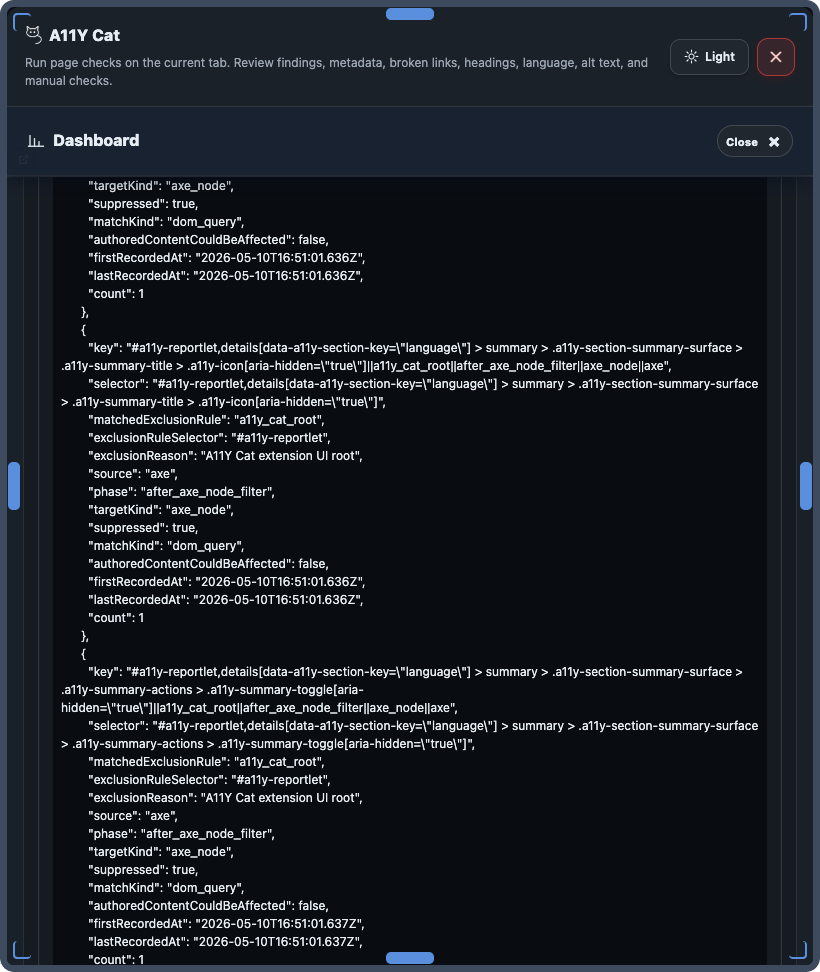
Expose selectors, snippets, rule IDs, notes, limitation context, and module-specific evidence for remediation or review.
Summary counts
Counts appear across the panel and workspace to help reviewers prioritise work quickly without flattening every result type into the same severity.
Manual boundary
Selectors, snippets, and counts can become stale after page changes or a different scan state.
Inspect, highlight, selector, and handoff actions
Inspect and highlight
Help reviewers and engineers map evidence back to the current page target behind the issue.
Copy selector
Speeds up reproduction and engineering inspection without pretending the selector alone proves user impact.
Ticket or handoff actions
Support structured remediation handoff when the current surface exposes local workflow or ticket-routing controls.
Manual boundary
Targets can move or disappear after DOM changes, and reviewers still need to preserve the correct evidence class in the handoff.
Workspace, assistant, panel controls, theme, and clear data
Open Workspace
Launches the local dashboard workspace page using the latest saved extension snapshot instead of injecting a second large review surface into the tested page.
Ask A11Y Cat
Optional local assistant drawer for supported page facts, scan triage, bundled WCAG-reference questions, issue explanations, and bounded handoff drafting. It is advisory support, not proof.
Panel position, theme, and result status
Resize, move, theme, and status controls help reviewers keep the tool readable while they inspect dense pages or high-zoom states.
Clear local data
Supports privacy and retention hygiene after the review ends, but does not affect copies already exported outside the browser.
View severity filtersView issue detailsView highlight actionView handoff dialogView panel resize controlsView theme settingsView clear-data controls