
Start from a homepage or a scoped section such as /en, stay on the same host, and follow internal
navigation—after robots.txt and sitemap-first discovery when those are available.
Documentation & installer
Catch broken routes before users do.
Same-host crawl from any start URL—then review redirects, parameters, soft failures, and URL patterns in grouped reports instead of a flat link list.
Prefer a link? Copy the bookmarklet URL below. Crawls run in your deployed app and backend—not on this page.
The bookmarklet opens Cat Crawler from your current tab and prefills the start URL.
Validation report
Live UI after a crawl

Captured with Playwright against a running instance (demo crawl).
Demo
See Cat Crawler in motion
Short product walkthrough showing the live interface, crawl flow, and report views in the current build.
Cat Crawler demo video
Current product walkthrough
Overview
Practical QA, not a wall of URLs
Start fast, keep the crawl scoped, and read results in sections you can act on—without digging through a raw dump.
Check redirects, parameter handling, and successful pages that still appear broken in practice.
Use exclude paths, per-path crawl limits, and optional job-page suppression to avoid low-value results.
Store browser presets for common site sections and export the report as TXT or CSV when needed.
Audience
When click-through QA does not scale
Teams who ship sites and need repeatable, same-host checks—without pretending one tool replaces judgement.
Developers
Check internal routing, redirects, query-driven pages, and release regressions before or after deployment.
QA & delivery
Run repeatable checks for launch readiness, spot broken navigation faster, and export a report for follow-up.
SEO & content
Review redirect chains, duplicate-looking URL patterns, and parameter handling without crawling the whole web.
Flow
Four calm steps
The app starts a background crawl job; the UI polls for progress and results. The bookmarklet is only a launcher from the tab you already have open.
Choose the starting URL
Use a homepage or a specific section if you only want one part of the site.
Set crawl rules
Add exclude paths, per-path limits, and optional checks such as broken-link status or parameter audit.
Run the crawl
The backend creates the job, respects robots.txt, seeds discovery from sitemap entries when available
(including robots.txt hints and default sitemap.xml), then follows internal routes and reports
progress back to the UI.
Review grouped results
Use the validation and audit sections to triage issues, then export TXT or CSV if you need to share them.
Product
Built for review, not just collection
Each block maps to the live app. Screenshots below are captured from a real run.
Dashboard
Main dashboard and progress
The main runner view combines crawl setup, live progress, and the latest run state so you can see whether a crawl is queued, running, complete, or failed.
- Progress percent, phase, and crawl counts
- Latest crawl stays visible after completion
- Failures surface in the same view
Main dashboard and progress
Hero and progress ring
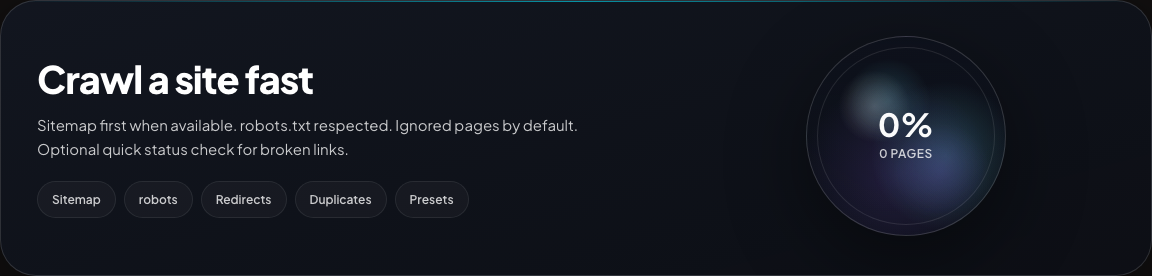
Standard app shell with start URL supplied via ?url= (same prefill mechanism the bookmarklet uses).
Crawl settings
Runner and scope controls
Seed the crawl, exclude sections, cap noisy paths, and choose broken-link checking or parameter audit—without touching backend code.
- Exclude paths as simple line-by-line rules
- Per-path limits match language variants (e.g.
/joband/en/job) - UI clamps
maxPagesandconcurrencyto backend caps
Crawl runner and scope controls
Start URL, excludes, toggles
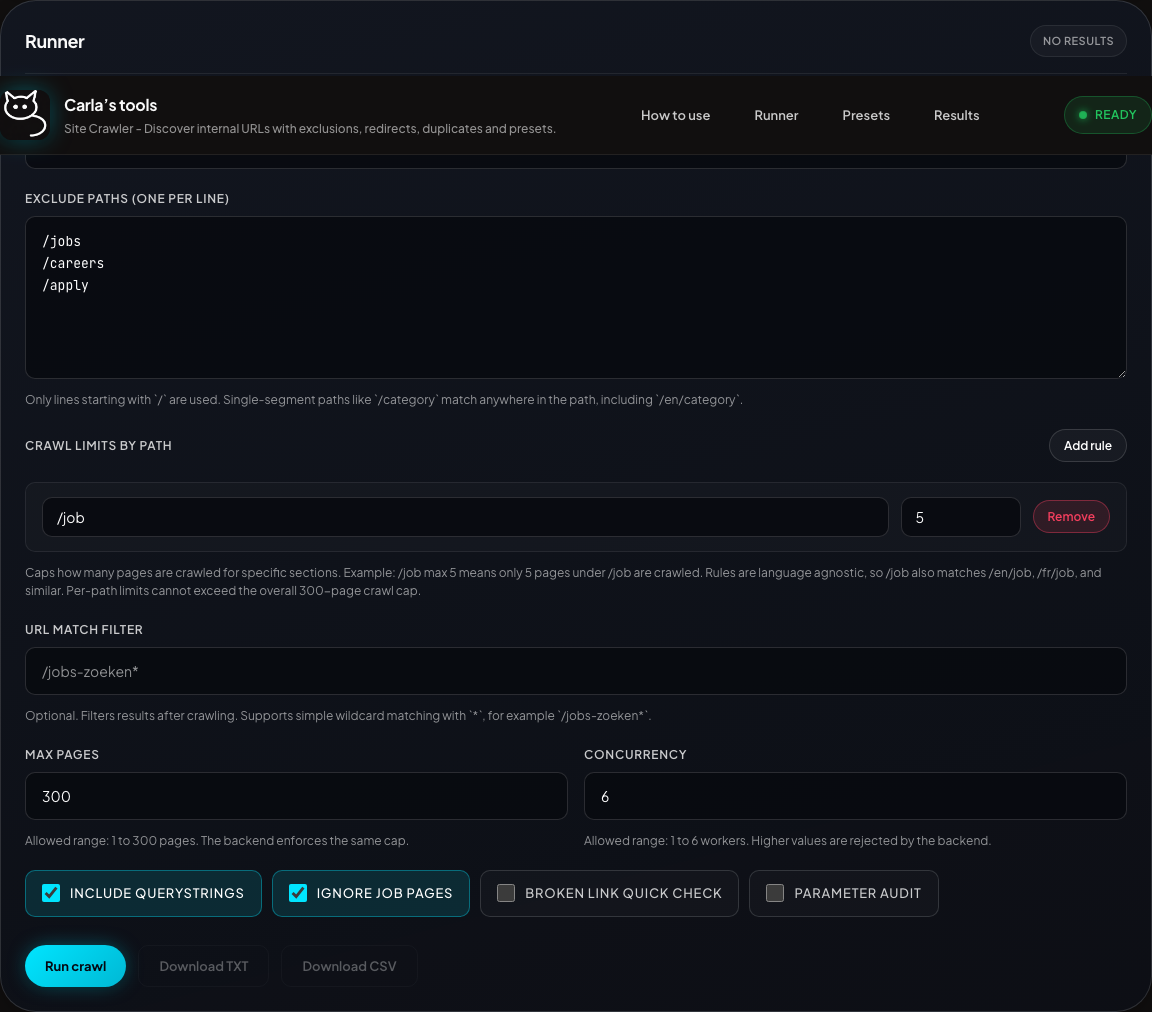
Runner section: scope, limits, and crawl options.
Progress
Active crawl
While a job runs, the dock shows phase, percent, and counters so you can tell whether the crawl is still moving.
- Queued, discovered, and crawled counts
- Optional navigation and parameter audit progress
Crawl in progress
Progress dock during a run

Captured mid-run against a demo crawl.
Validation
Main validation report
One place for broken URLs, redirect issues, parameter issues, soft failures, and impact findings—so triage starts with groups, not raw rows.
- Broken URLs separated from redirect and soft-failure issues
- Referrers and final URLs stay visible
- Impact highlights repeated or core-flow problems
Main validation report
Grouped issues
Validation report block opened after crawl.
Redirects
Redirect audit
Dedicated view for chains, loops, multi-hop redirects, dropped parameters, and irrelevant destinations.
- Status codes and final destinations
- Loops and long chains flagged
- Query parameters dropped by redirects surfaced
Redirect audit
Chains and flags

Redirect audit details when issues exist; otherwise the section summarises zero issues.
Parameters
Parameter audit
Sends a small set of querystring variations and records whether parameters are preserved, dropped, or redirected unexpectedly.
- Search pages, filters, pagination
- HTTP errors separated from preservation issues
- Base URL, variant, and final URL together
Parameter audit
Variants and outcomes

Shown with parameter audit enabled for the demo crawl.
Soft failures
Catch pages that look broken even on 200 responses
Reviews successful pages for empty content, failed API calls, missing expected components, and error-text patterns that plain status-code checks miss.
- Missing content and thin responses
- Failed fetch/XHR calls surfaced beside the page URL
- Error text patterns grouped into one review section
Soft failures
Heuristic review inputs
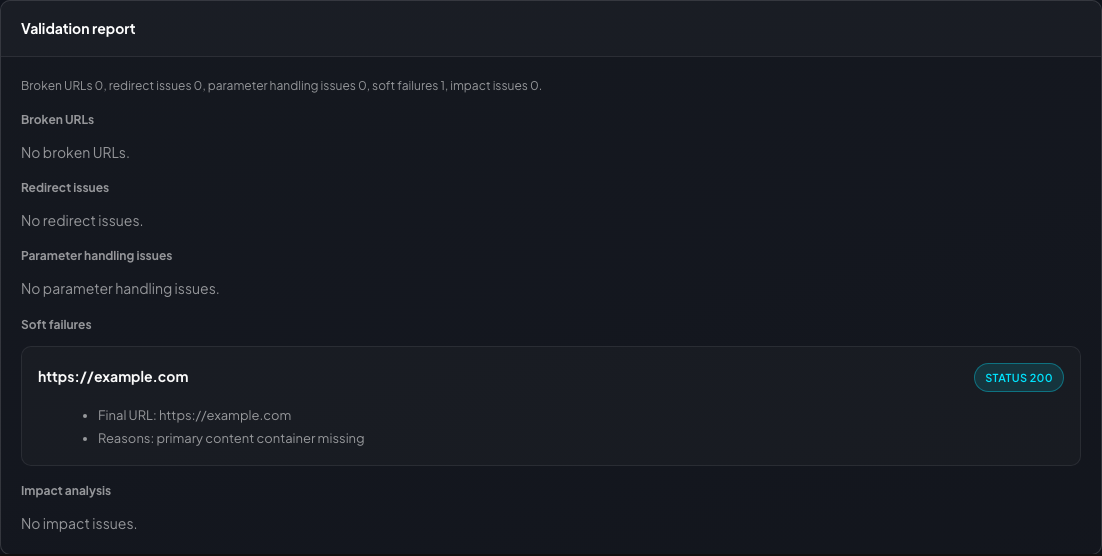
Soft failures when present; otherwise the section shows that no review issues were detected for the crawl.
Prioritisation
Issue impact keeps repeated and core-flow problems near the top
Converts broken or redirected findings into a prioritised list using occurrence count, referrer count, and core-flow signals.
- High, medium, and low impact groupings
- Occurrence count and referrer count exposed directly
- Core-flow signal carried into the issue detail
Issue impact
Prioritised crawl findings

Shown after the same demo crawl; when no high-impact issues exist the section still exposes the zero-state summary.
Structure
URL patterns and duplicate candidates stay review-oriented
Groups duplicate-looking URL structures, legacy-vs-current paths, inconsistent naming, and duplicate-content candidates without pretending they are final verdicts.
- Duplicate structural patterns grouped together
- Legacy/current path pairs surfaced for migration review
- Duplicate candidate groups remain explicitly heuristic
URL patterns
Structure-focused review

Duplicate content candidates live in the same results area just below this section and follow the same review-first framing.
Outputs
Results by issue type—not only by URL
Move from raw crawl output to grouped issues quickly. These views support judgement; they do not replace it.
Validation report
Broken URLs, redirects, parameters, soft failures, and impact—summarised.
Audit report
Crawled navigation entries with source, referrer, final URL, and classification.
Issue impact
Prioritised issues by severity, repetition, and flow importance.
Exports
TXT or CSV from the rendered report for handoff.
Duplicate candidates
Grouped URL variants for review—not a final duplicate verdict.
Client presets
Save, export, import, and reload crawl settings for repeatable runs.
TXTShareable export
CSVStructured data
PresetsRepeatable runs
Audit report
Primary text report field
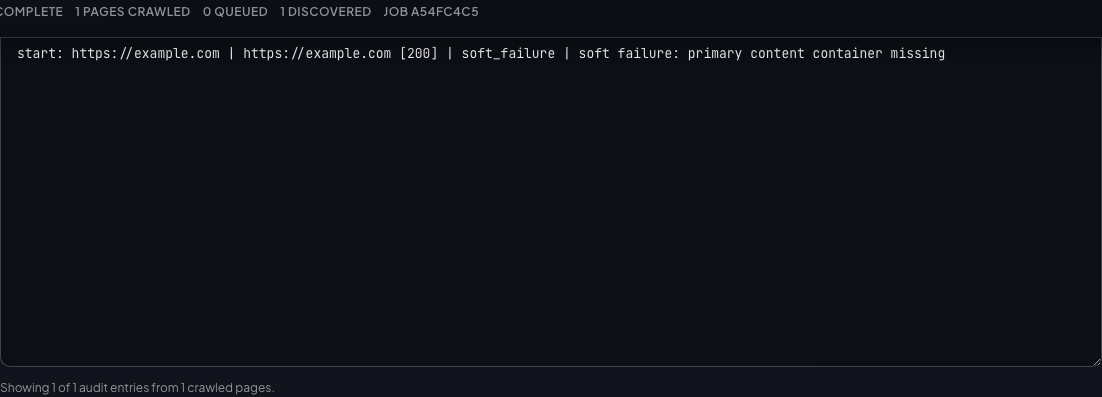
Audit report lines derived from the same demo crawl as the other shots.
Repeatable runs
Client presets keep recurring crawls consistent
Store crawl settings in the browser, export them as JSON, import them on another machine, and reload them before a client check or regression run.
- Save named crawl configurations
- Export and import preset bundles as JSON
- Reload settings without rebuilding the crawl form by hand
Client presets
Saved crawl settings
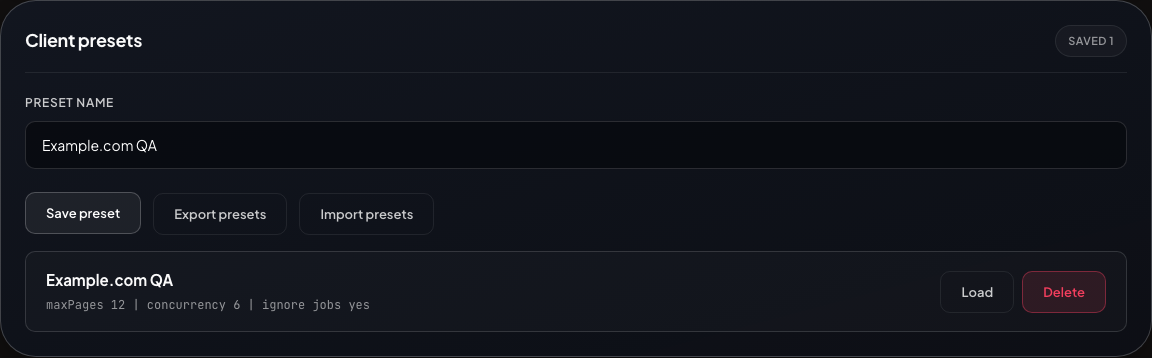
Presets are browser-stored client-side settings, not shared backend records.
Bookmarklet
Open Cat Crawler from the page you are on
Loads docs/bookmarklet.js from this site, reads appOrigin, then opens the full panel immediately
with the app in an iframe and the current tab URL prefilled.
What it does
- Opens the full Cat Crawler panel on first use (Hide collapses to a small control; Show restores it).
- Loads the app from configured app origin inside the panel iframe.
- Passes the current page URL as the starting URL; running the bookmarklet again on another page refreshes the iframe.
- Re-running the bookmarklet focuses the same instance—no duplicate panels.
- Drag the title bar to move; resize from the corners.
- Public docs config must set the correct
appOrigin. - The app must be deployed at that origin.
- Regenerate
docs/config.jsbefore publishing a new environment.
Current docs config:
local
· app origin (from docs/config.js)
Bookmarklet mode
Same app with ?mode=bookmarklet
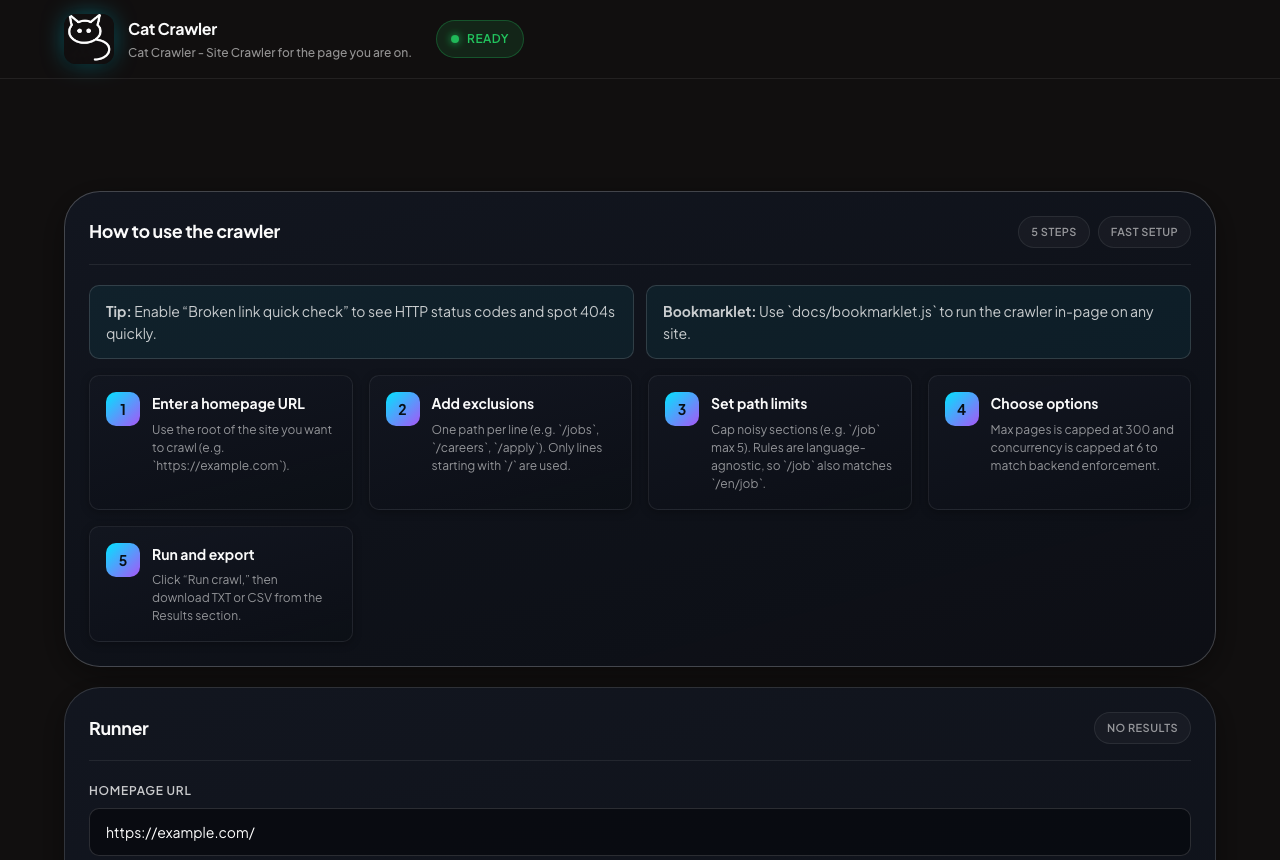
Full in-panel iframe matches this view; the bookmarklet adds chrome, loading state, and error handling around it.
Bookmarklet link will be generated from docs/config.js and docs/install.js.
Reference
Important facts to keep in mind
Operational facts for the current build—kept below the product story on purpose.
Current run model
- React frontend plus Node.js backend; supported runtime is Node.js
22.x(see README). - The normal UI flow uses background crawl jobs with polling, not a hosted crawl on GitHub Pages.
- GitHub Pages hosts this static docs site and the bookmarklet loader only.
- The bookmarklet opens the deployed app in an iframe and passes the start URL as the
urlquery parameter.
Current limits
- Same-host crawling only.
- Public
http(s)targets only; internal, loopback, link-local, and metadata destinations are blocked. - UI and backend caps are
300pages and6concurrency. - Crawl jobs are rate-limited; caps and safety rules are enforced server-side.
- Active crawl jobs are hard-capped to
2(CRAWL_MAX_ACTIVE_JOBS). - Soft-failure, pattern, impact, and duplicate-candidate views are review aids—heuristic or grouped—not absolute verdicts.
Production deployment notes
- Local development defaults to file-backed job state.
- Staging and production must use
JOB_STATE_BACKEND=firestore. - Production instances must share the same Firestore backend and collection prefix.
- The bookmarklet must point at a real deployed app origin.
What the docs site is not
- It is not a hosted crawler service by itself.
- It does not replace the backend or production app deployment.
- It must be published with the correct
BOOKMARKLET_APP_ORIGINto be useful outside local development.
Setup
Start locally, then publish the docs with the right app origin
Readable summary here; deep ops detail lives in the README—especially bookmarklet appOrigin wiring.
Run locally
- Use Node.js
22.x. - Run
npm ciinfrontend/andbackend/. - Build the frontend with
npm run buildinfrontend/. - Start the backend with
npm startinbackend/. - Open
http://localhost:8080and confirm/healthzresponds. - Use
APP_ENV=localif you regeneratedocs/config.jsfor local bookmarklet testing.
cd frontend
npm ci
npm run build

cd ../backend
npm ci
npm start
Deploy professionally
- Build the production container from the repository
Dockerfile. - Deploy the container to a container host that runs the repository
Dockerfile. - Use
JOB_STATE_BACKEND=firestorein staging and production. - Publish the app on HTTPS and set
BOOKMARKLET_APP_ORIGINto that final app URL when generating docs. - Validate the installer wiring before releasing the public docs.
docker build -t cat-crawler .

APP_ENV=production \
BOOKMARKLET_APP_ORIGIN=https://your-app.example.com \
node scripts/write-public-config.mjs

APP_ENV=production \
BOOKMARKLET_APP_ORIGIN=https://your-app.example.com \
node scripts/validate-public-docs.mjs
- Container image built and published
APP_ENV,TRUST_PROXY, and Firestore settings configured- HTTPS app URL confirmed and used for
BOOKMARKLET_APP_ORIGIN /healthzchecked after deploy- GitHub Pages docs re-published after config refresh
Roadmap
Level-up features on the roadmap
This roadmap is product-facing. It focuses on stronger crawl features, faster review, and better report workflows.
Smarter crawl control
- Add saved crawl histories with one-click rerun from previous settings.
- Add advanced include and exclude rules with preview before a crawl starts.
- Add per-section crawl summaries so large sites are easier to scan.
Deeper issue analysis
- Add clearer issue severity scoring with stronger explanations for why a finding matters.
- Add better deduplication across related URLs so repeated issues collapse into cleaner groups.
- Add richer page context for failures, including title, template clues, and stronger source grouping.
Team workflow
- Add shareable report views for handoff without exporting raw files first.
- Add comparison mode between two crawls to spot regressions after a release.
- Add stronger preset tooling for client packs, reusable defaults, and faster setup.